Why a virtual battery
Before I owned a home battery, I wanted to know what one would actually save me in my house, with my solar panels and my consumption. Datasheet round-trip efficiencies and generic calculators were not good enough for that, so I simulated a battery inside Home Assistant with the battery_sim integration and drove it with the same kind of charge and discharge logic a real one would need.
Two things made the numbers realistic. First, the simulated battery used real-world efficiency measurements shared by other owners on Dutch and German forums, including at low power, where real inverters are much worse than their headline figure. Second, the control logic was not “charge on sun, discharge on demand”: it followed my dynamic tariff, kept reserves for the night and the morning peak, and learned my consumption day by day.
This setup ran until I received a real battery, at which point I replaced my automation with Day Ahead Optimalisering (DAO). I am writing it down now, before I remove the automations from Home Assistant, because several of the ideas are worth keeping even if the YAML is not.
The setup
battery_sim creates a virtual battery from your grid import and export sensors and exposes it as normal Home Assistant entities. The ones my automations used were:
| Entity | What it does |
|---|---|
sensor.<battery> | Energy currently stored, in kWh |
select.<battery>_battery_mode | Default mode, Force charge, Force discharge, Discharge only |
number.<battery>_minimum_soc / _maximum_soc | Floor and ceiling for the state of charge, in % |
number.<battery>_charge_limit / _discharge_limit | Maximum charge and discharge power, in kW |
In my configuration these entities are all called marstek_venus_e_5_12kwh_2nd_gen. I started by simulating a Marstek Venus E (5.12 kWh), later switched the simulation to a Zendure (8 kWh), and never renamed the device. That history also explains a couple of hardcoded capacities you will see below.
The rest of the state lives in helpers:
input_datetimehelpers for the morning peak start and end, the evening forced-discharge start, the mid-day charge time and the top-up times. My tariff is dynamic, but I did not use day-ahead prices directly: I worked with the usual peak hours and adjusted these helpers by hand, almost every day.input_numberhelpers holding the learned hourly consumption for the night and for the morning peak.input_booleanhelpers to switch the night and morning reserves on or off, to enable forced discharge at all, and to flag that the dishwasher or washing machine will run tonight.
For the consumption measurements I use a house consumption sensor. After I bought a real battery, I added the real battery’s export and subtracted its import (sensor.zendure_energy_export and sensor.zendure_energy_import), so the calculations kept seeing the house as if no battery were installed. The virtual battery should react to the house, not to what the real battery was already doing.
The daily cycle
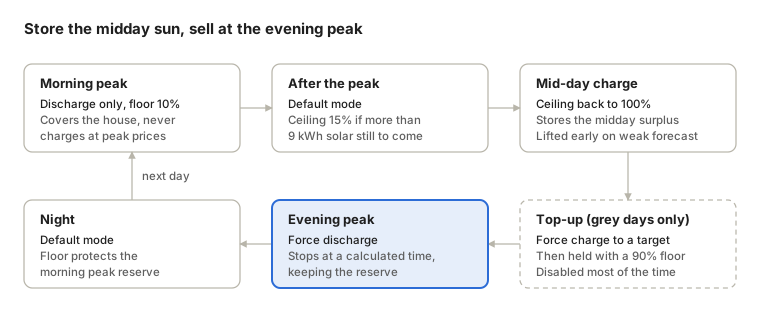
Every phase started from an input_datetime helper, and the battery went through the same loop each day:
The phases are in order, not to scale: I moved the peak times by hand almost daily. The sections below go through each one.
Morning peak and the midday hold
The morning is simple: at the start of the morning peak the battery goes to Discharge only with a 10% floor, so it covers the house but never charges during expensive hours.
The interesting part is what happens right after. On a sunny day, a battery in default mode would fill up with the first morning surplus, which is still worth quite some money if exported, and be full well before noon, when exports are worthless. I wanted it to store the midday surplus instead. So at the end of the morning peak the automation checks the solar forecast for the rest of the day:
- if:
    - condition: numeric_state
      entity_id: sensor.solar_panels_forecast_today_remaining
      above: 9
  then:
    - action: number.set_value
      target:
        entity_id: number.marstek_venus_e_5_12kwh_2nd_gen_maximum_soc
      data:
        value: 15
  else:
    - action: number.set_value
      target:
        entity_id: number.marstek_venus_e_5_12kwh_2nd_gen_maximum_soc
      data:
value: 100With more than 9 kWh still to come, the ceiling drops to 15%: the battery stays almost empty and the morning surplus goes to the grid. At the configured mid-day charge time the ceiling goes back to 100% and the battery fills on the midday sun.
There is one safety net. If the remaining forecast falls below 9 kWh while the ceiling is still under 20%, a separate trigger lifts it to 100% immediately. A cloudy afternoon should not leave the battery empty for the evening.
Evening: discharge everything except the reserve
The evening peak is where the battery earns most, so at the forced-discharge start time the battery exports whatever it will not need before the next morning peak ends. The whole calculation is about that reserve.
Here h is a number of hours and P is the learned average consumption in kWh per hour, for the night (n) and the morning peak (m). The night runs from the discharge start to the morning peak start; the morning is the peak itself. Each reserve can be switched off with its own input_boolean, which sets its hours to zero. E_fixed is a 1 kWh buffer, and E_appliances adds 1.3 kWh for the dishwasher and 1.0 kWh for the washing machine when they are flagged for tonight.
One small trick: today_at() always returns today’s date, so in the evening it points at this morning’s peak. Shifting the start back by 24 hours gives the same duration as tonight until tomorrow morning, without date juggling:
start_night: "{{ now() - timedelta(hours=24) }}"
end_night: "{{ today_at(states('input_datetime.battery_morning_peak_start')) }}"Efficiency at the power you actually use
The efficiency term matters more than it looks. At night the house draws a few hundred watts, and at that power a battery inverter is far less efficient than at its rated power. My first version used a hardcoded 75%. Later I implemented a battery_sim.get_efficiency action that returns the efficiency from the measured curve at a given power level, and it is now in upstream battery_sim:
- action: battery_sim.get_efficiency
  data:
    device_id: "{{ device_id('sensor.marstek_venus_e_5_12kwh_2nd_gen') }}"
    efficiency_type: discharge
    power_level: "{{ [night_hourly_consumption, 0.1] | max }}"
response_variable: night_efficiencyBecause the learned consumption is in kWh per hour, it is also the average power in kW, so it can go straight in as the power level. The 0.1 kW floor avoids asking for the efficiency at zero power.
Starting and stopping
The automation writes the calculated end time into input_datetime.battery_forced_discharge_end, raises the minimum SOC to protect the morning reserve, and switches the mode to Force discharge. When the end time is reached, the battery returns to Default mode with the same floor, so it covers the night but leaves enough for the morning peak:
The 8 is the capacity of the simulated 8 kWh battery. If forced discharge is disabled for the day, the evening trigger just sets Default mode with a 10% floor.
Learning the consumption rates
The reserve is only as good as P_n and P_m, so two automations re-measure them every day instead of relying on a fixed guess. Both work the same way: snapshot a cumulative energy counter at the start of a window, read it again at the end, and divide by the window length.
- Morning: snapshot at the morning peak start, measure at the morning peak end, store in
input_number.battery_threshold_for_morning_reserve. - Night: snapshot at the forced-discharge start, measure at the next morning peak start, store in
input_number.battery_threshold_for_night_reserve. The duration uses the same 24-hour shift as the evening calculation.
variables:
  total_now: >-
    {{ (states('sensor.energy_consumption') | float(0))
       + (states('sensor.zendure_energy_export') | float(0))
- (states('sensor.zendure_energy_import') | float(0)) }}The snapshot is stored in an input_number so it survives a restart during the window. The result is clamped at zero, rounded to three decimals, and becomes tomorrow’s estimate.
The night measurement needs one correction. If the dishwasher or washing machine ran overnight, its energy would inflate the baseline and the next evening would keep too much in reserve. So when those flags are on, the automation subtracts the daily consumption of their smart plugs before dividing, then clears the flags for the next day. The appliances are then added back explicitly, and only on nights when they really run.
Knowing the dishwasher will run tonight
By the time the dishwasher or washing machine actually starts at night, the evening discharge is already over. So the automation does not detect them running: it detects them waiting. A machine armed in delayed-start mode draws a small but recognisable standby power, and the smart plugs are sensitive enough to see it.
| Appliance | Plug sensor | Delayed-start signature |
|---|---|---|
| Dishwasher | sensor.gosund_watt | Above 1.5 W |
| Washing machine | sensor.sp111_4_watt | Between 1.75 and 2.15 W for 20 minutes |
For the washing machine, the narrow band and the 20-minute hold keep brief power readings from counting as an armed machine. Both triggers only count between 17:00 and 03:00, and they turn on input_boolean.battery_dishwasher_at_night or input_boolean.battery_laundry_at_night.
Those flags feed the evening reserve (+1.3 kWh and +1.0 kWh) and the next morning’s correction of the night baseline. As long as the machine is armed before the forced discharge starts, the battery keeps enough energy to run the machines instead of buying it back from the grid at night.
Top-up on grey days
The top-up charge was disabled most of the time. It existed for days with too little solar to fill the battery while the evening peak was still expensive, so buying some energy at a cheaper hour and selling it at the peak was worth it.
At the configured calculation time, a script works out how long a forced charge has to run:
top_up_kwh: "{{ 5.12 - 0.512 - (current_charge - 0.512) * 2 }}"
available_charge_power_kw: "{{ max_charge_rate - current_charging_rate_w }}"
top_up_hours: "{{ top_up_kwh / available_charge_power_kw * 1.1 }}"The target starts from the usable capacity above the 10% floor and subtracts what is already stored. The charge power is the charge limit minus what the battery is already taking from solar, because only the remaining headroom comes from the grid. A 10% margin covers the power not being perfectly constant. The script writes the end time into input_datetime.battery_end_of_next_top_up_charge, and the automation switches to Force charge if that time is still ahead.
When the end time arrives, the battery returns to Default mode with the minimum SOC raised to 90%. That floor holds the energy until the evening, when the forced-discharge automation lowers it again and sells it at the peak.
The 5.12 kWh and 0.512 kWh are left over from the Marstek simulation and were never updated for the 8 kWh setup.
The calculation {{ 5.12 - 0.512 - (current_charge - 0.512) * 2 }} is meant to estimate how much to top-up: based on the fact that morning and afternoon have similar solar production, I assume that the amount charged so far will also be charged in the afternoon with solar, and I need to top-up the remaining to reach 100%.
What worked, what didn’t, and what came next
The parts I would reuse are the ideas, not the YAML: size the evening discharge from a reserve instead of a fixed SOC, learn the consumption rates from your own meter every day, use the efficiency at the power you will actually draw, and look for appliances that have been armed for a delayed start.
The weak points were just as clear:
- Manual peak hours. The time helpers followed the usual peak hours, and I adjusted them by hand almost every day. The logic never looked at actual prices.
- Fixed thresholds. The 9 kWh forecast threshold, the 15% ceiling and the 1 kWh buffer were tuned by hand and did not adapt to the season.
- Hardcoded capacities. The move from a 5.12 kWh to an 8 kWh simulation left 5.12 in the top-up script and 8 in the SOC formulas. Entity names still say Marstek.
- Leftovers. An unused
efficiency_loss: 0.75variable still sits in the discharge automation, from beforeget_efficiencyexisted.
These are exactly the things an optimizer handles better, which is why I replaced all of this with Day Ahead Optimalisering (DAO). It plans charge and discharge from day-ahead prices and forecasts instead of fixed hours and thresholds. The rule-based version was still worth building: it gave me realistic savings estimates before buying a battery, and the get_efficiency action it needed now lives in battery_sim for anyone else.